A free workout tracker for iPhone
PRGRES is a free workout tracker for iPhone with unlimited custom workouts and plans, no account and no ads, and its App Store privacy label reads “Data Not Collected”.
Log sets, reps, weight and RPE. Next session, each set shows a Suggested target based on last time, and the Stats tab charts your estimated 1RM.

For iPhone and iPad with iOS 17 or later.
★★★★★
“Just started using this, was exactly what I was looking for from a workout tracker, and no cost for all the features.”
Mdm2198, App Store review in the US, October 12, 2026 ★★★★★
“Free and very thorough, nice app”
qqertyxyz, App Store review in the Netherlands, October 14, 2026
Logging a set
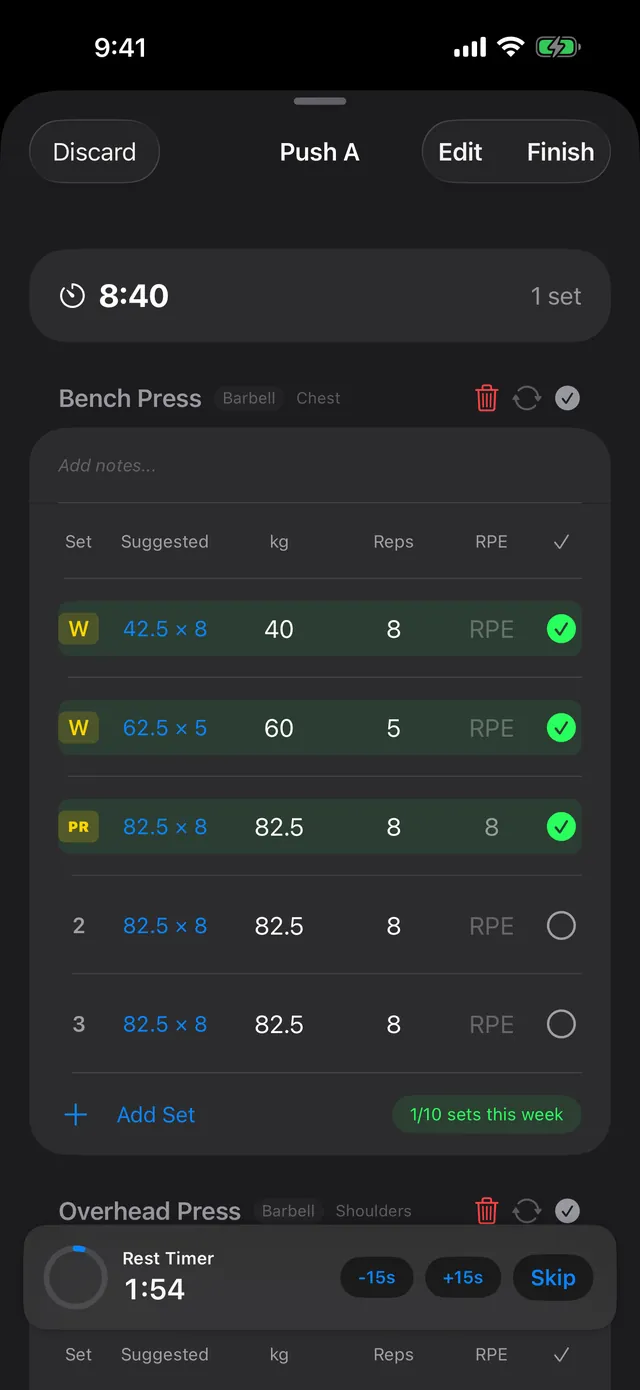
When you start a workout, each set is pre-filled with the weight and reps from your last session. PRGRES comes with 400+ exercises and 7 built-in programs, including StrongLifts 5×5, GZCLP and nSuns 5/3/1 LP, and you can build as many plans of your own as you like.
The Suggested column
Next to each set is a Suggested target, like 82.5 × 8 after 80 × 8 last time. It looks at the same set in your last session (set 2 against set 2, warm-ups against warm-ups), keeps the reps, and moves the weight by the RPE you logged for that set:
| Last time | Suggested weight |
|---|---|
| No RPE logged | +1 step |
| RPE below 7 | +2 steps |
| RPE 7–8 | +1 step |
| RPE 8.5–9 | Same weight |
| RPE 9.5–10 | About 5% lighter |
A step is 1.25 kg when the weight is under 40 kg, and 2.5 kg from 40 kg up.
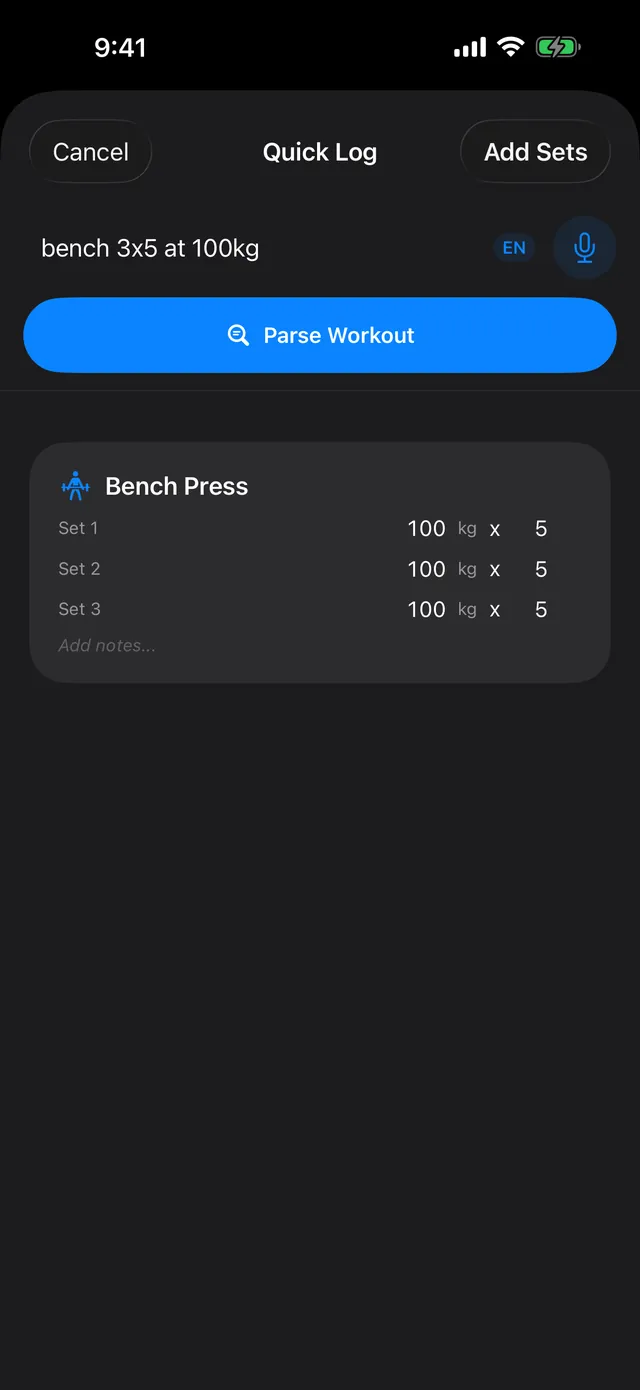
Quick Log: type or say “bench 3x5 at 100kg” and you get three sets of 100 kg × 5. It reads RPE too, as in “squat 5x5 @ 140kg RPE 8”. The parser is rule-based and runs on your phone, with no AI.
Warm-ups, rest and the Lock Screen
Mark a set as a warm-up and it shows a W instead of a set number. Drop sets, supersets and AMRAP sets have their own types too. Tick off a set and the rest timer starts. Use one rest time for everything or set one per exercise; the countdown has −15s, +15s and Skip buttons. During a workout, a Live Activity shows the exercise, your set number and the rest countdown on the Lock Screen and in the Dynamic Island.
After the workout
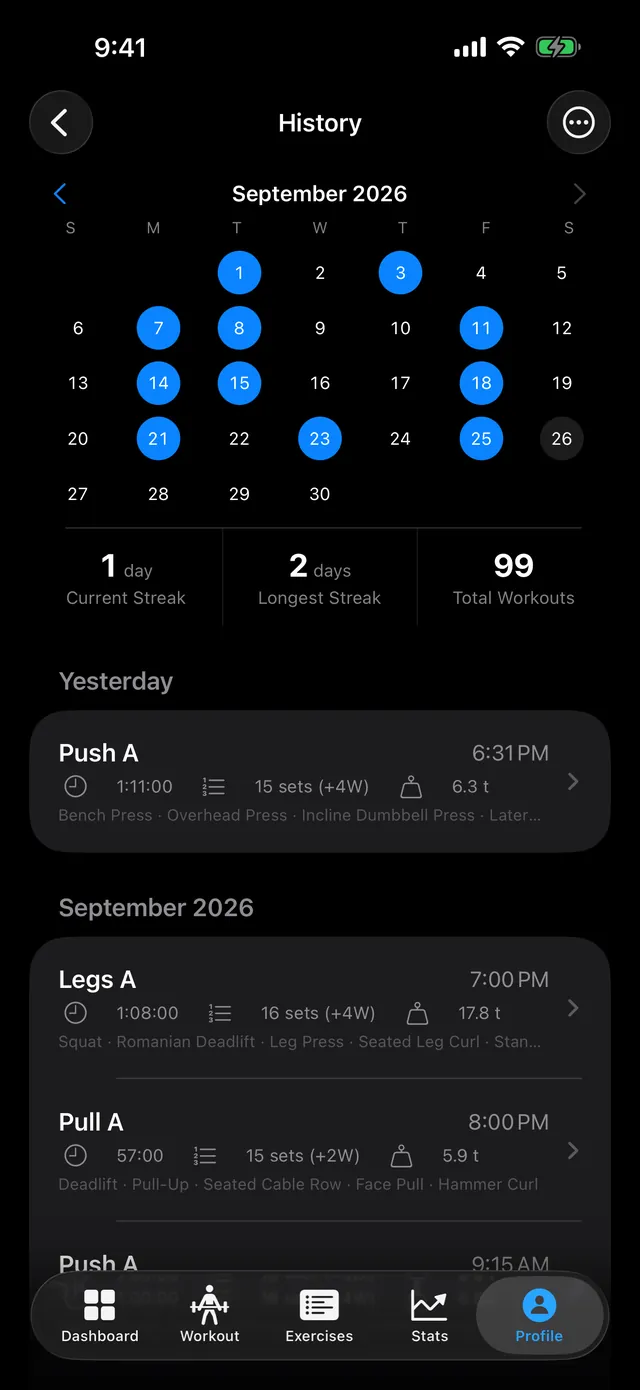
Everything you log feeds the Dashboard and Stats tabs. A PR is flagged when you beat your estimated 1RM, your heaviest weight or your session volume on an exercise.
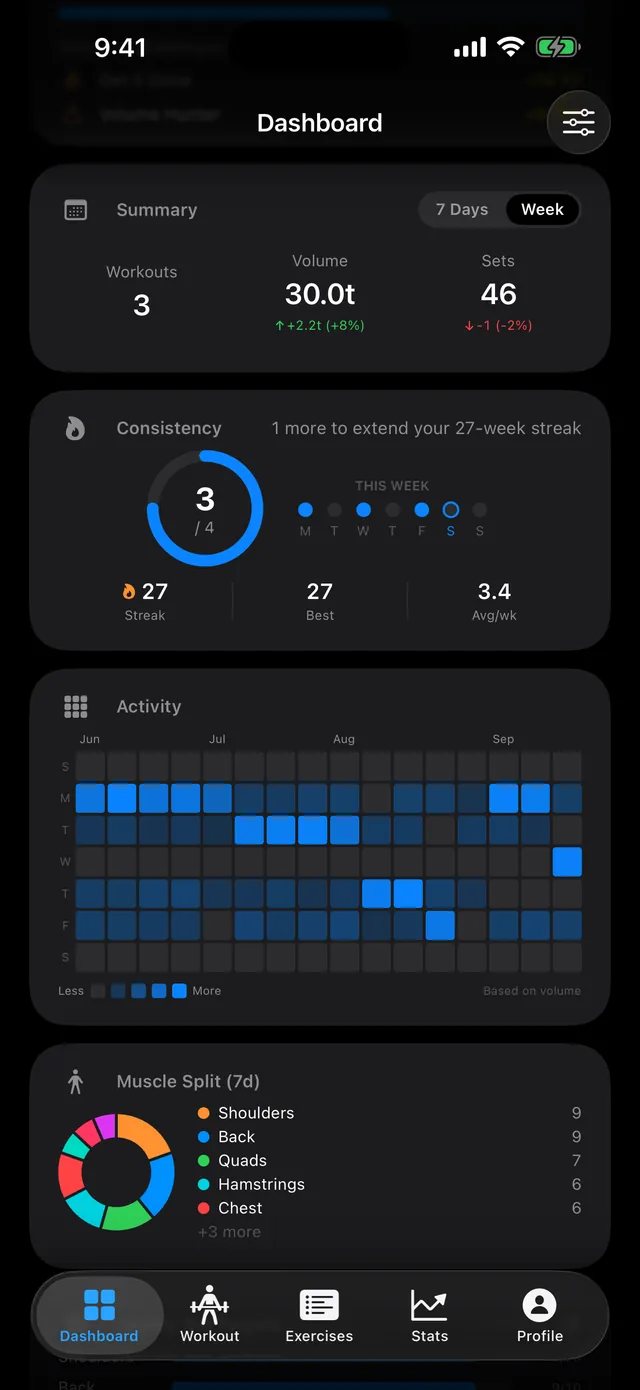
Dashboard. This week's workouts, volume and sets, your streak, a training heatmap and a 7-day muscle split. 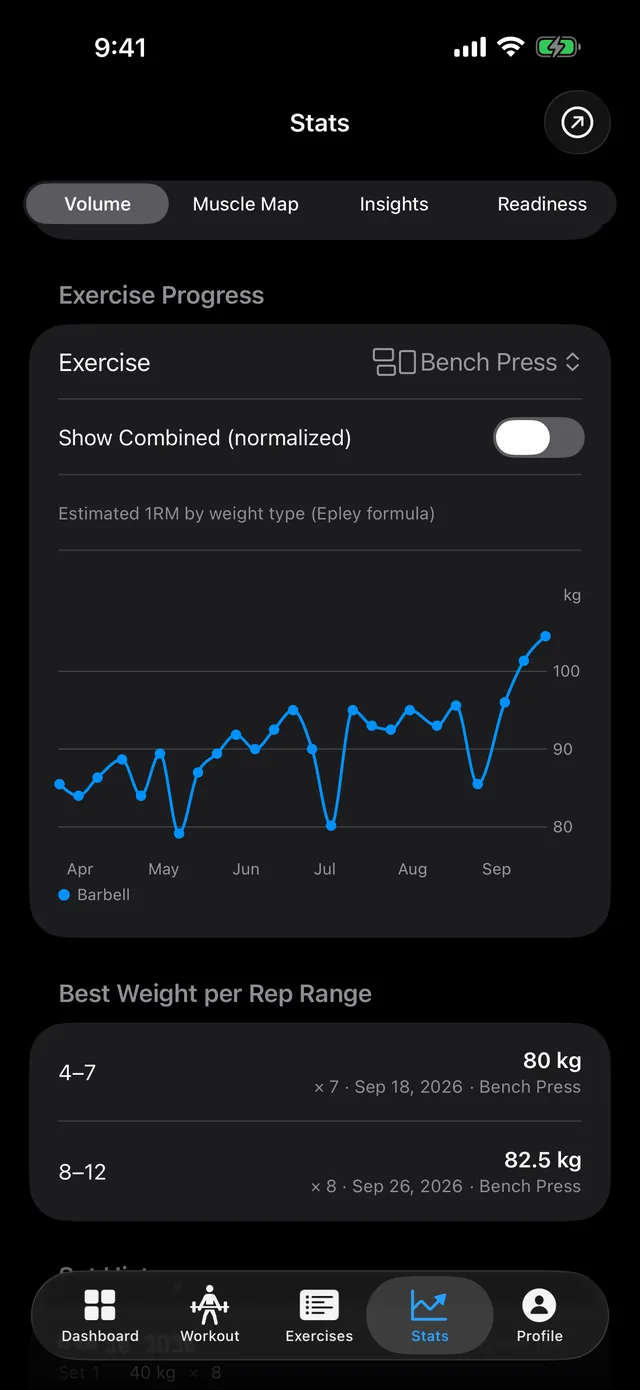
Stats. Estimated 1RM over time for each lift, and your best weight in each rep range. 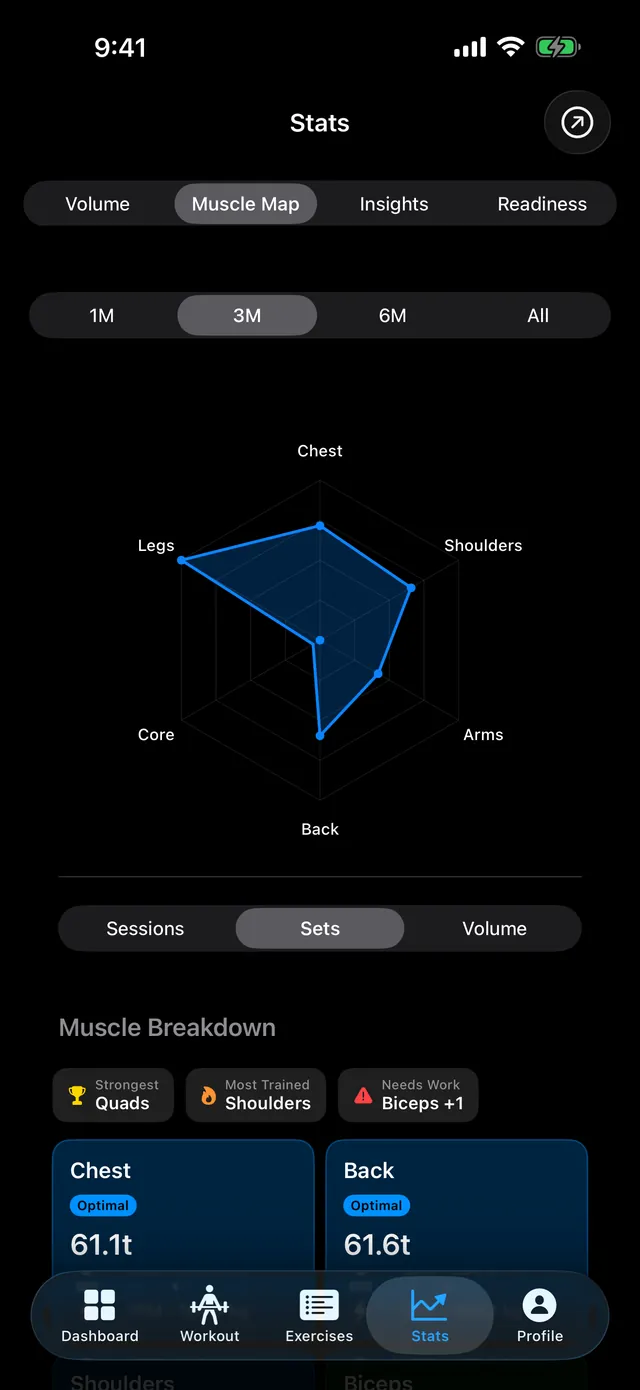
Muscle Map. A radar of training by muscle group, and a per-muscle breakdown with tags like Optimal or Below MEV. 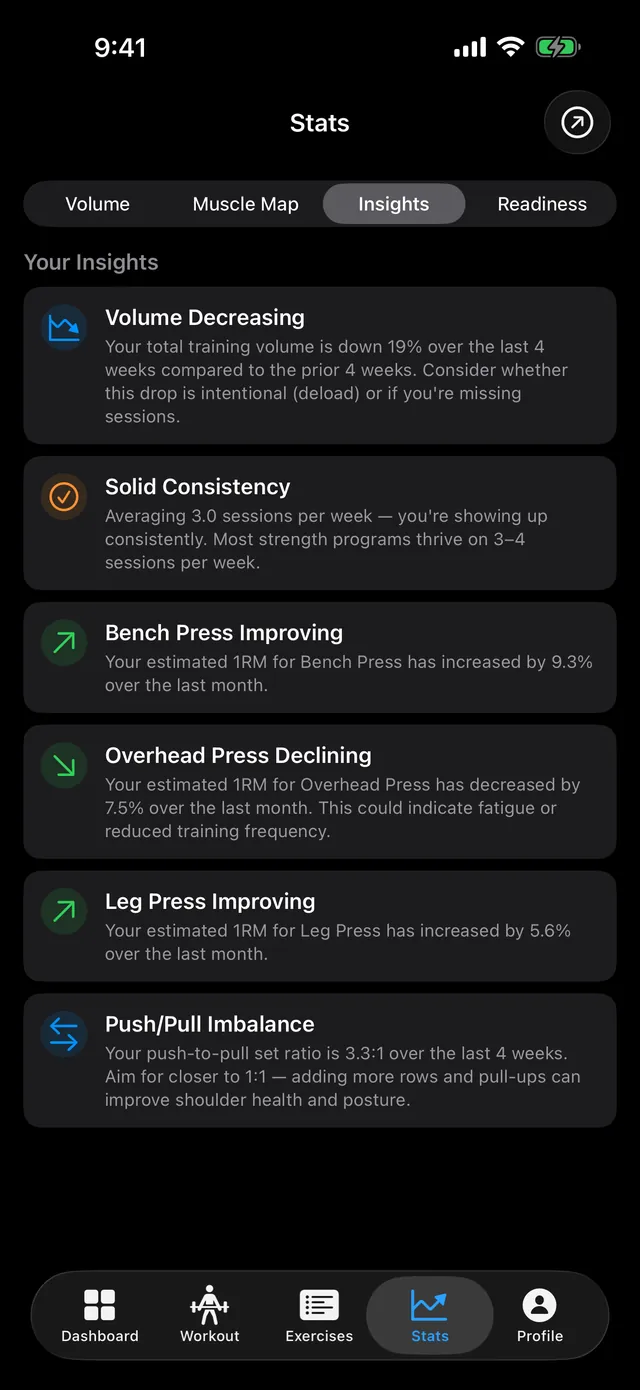
Insights. Notes like Solid Consistency, Bench Press Improving or Push/Pull Imbalance, worked out from your logged sets. 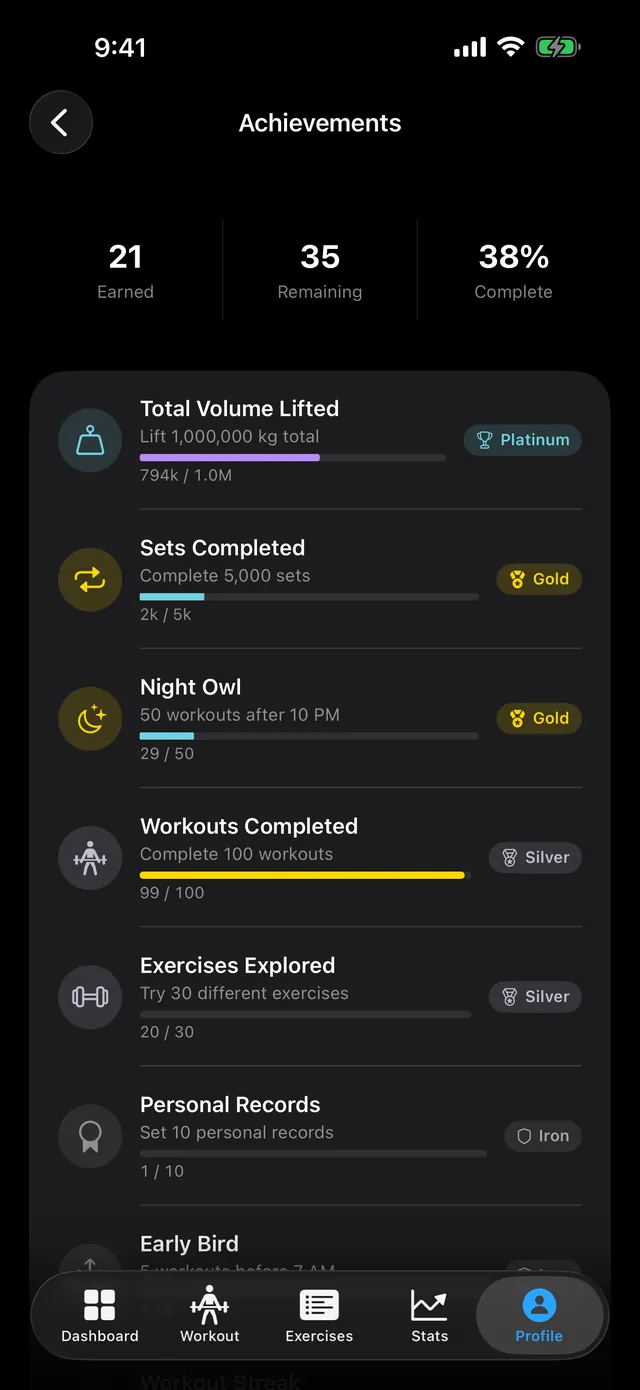
Achievements. 56 badges in 8 families, each with 7 tiers from Iron to Grandmaster.
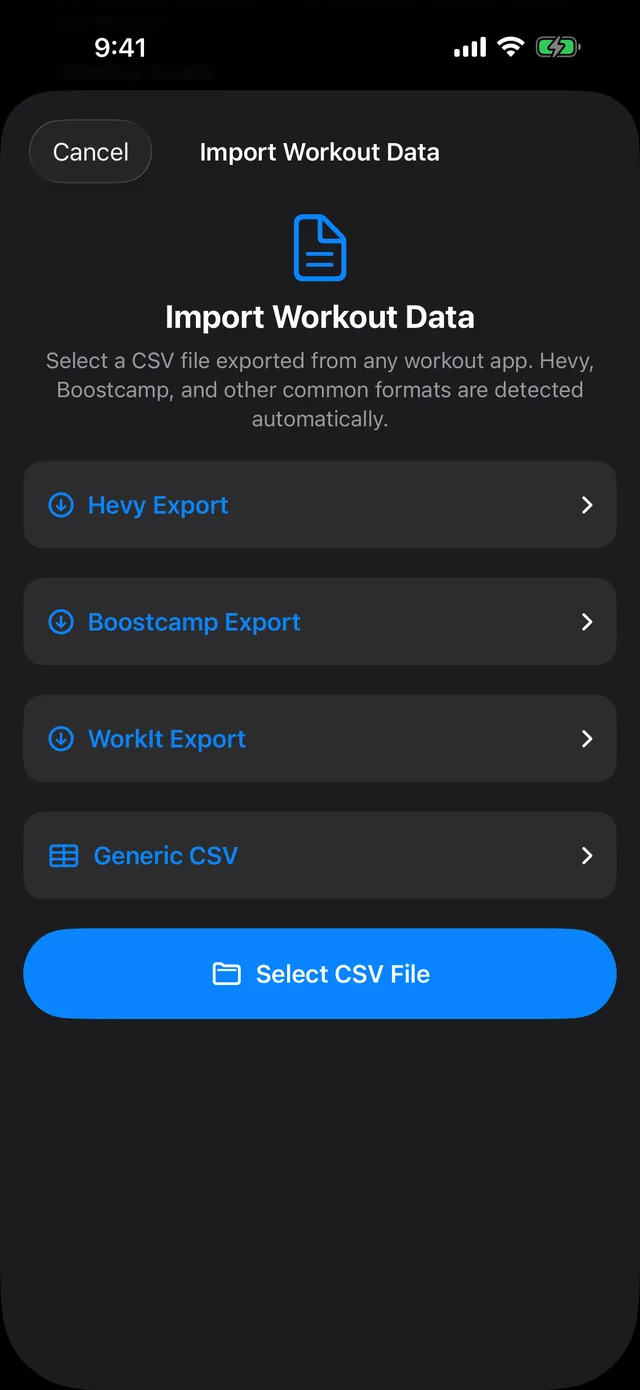
Switching from Strong, Hevy or another app?
PRGRES reads CSV exports from Strong, Hevy, Boostcamp and WorkIt, plus any CSV in its own format, and recognizes the format by its columns. To take your data elsewhere, export all your workouts to one CSV file from Settings or History.
What does PRGRES cost?
PRGRES is free. Every feature in the app is free, with no limits on plans, workouts, custom exercises or history.
- 400+ exercises
- 7 built-in programs
- 56 achievements
- 5 Home Screen widgets
In the app today
FreeEverything shown above, with no limits, plus strength leagues for bench, squat and deadlift, daily and weekly challenges, 5 Home Screen widgets and a plate calculator.
PRGRES+
PlannedPRGRES+, an optional paid add-on for cloud sync, backup, and an AI coach, is planned. It isn't available yet, and nothing in the app today moves behind it.
Why it's free
PRGRES runs on your phone and I don't run a server for it, so more users don't add to my costs. I'm Baris Yakali, and I build it on my own in the Netherlands as the tracker I wanted for my own training.
Does PRGRES collect your data?
No. The App Store privacy label for PRGRES reads “Data Not Collected”: the developer collects no data from the app. Your workouts are stored on your iPhone or iPad, PRGRES has no account system, and the tracker works fully offline.
A few things involve Apple. Dictation in Quick Log uses Apple's speech recognition, which may process the audio on Apple's servers. If you allow Apple Health (iOS 26 or later), workouts you track live are saved there. If you connect it for the readiness check, PRGRES also reads your sleep, heart rate variability and resting heart rate, on your device. And your iCloud or computer backups include PRGRES data, as they do for any app.
What do other workout trackers cost?
| App | Free version | Monthly | Yearly | Lifetime |
|---|---|---|---|---|
| PRGRES | Everything in the app, with no limits, no account and no ads. | Nothing to pay | Nothing to pay | Nothing to pay |
| StrongStrong PRO | Yes: unlimited workouts, 3 routines, free CSV export. Prompts you to sign up for an account. | $4.99 | $29.99 | $99.99 |
| HevyHevy Pro | Yes: no ads, unlimited workouts, 4 routines, 7 custom exercises, stats for the last 3 months. | $2.99 | $23.99 | $74.99 |
| Fitbod | No: a 7-day trial, then a subscription to log new workouts. | $15.99 | $95.99 | No standard planA limited lifetime promo appears around Black Friday. |
| JEFITElite | Yes (Basic, with ads). | $12.99 | $69.99 | None |
US App Store prices, checked October 11, 2026. Prices differ by country and change over time. App Store pages: Strong, Hevy, Fitbod, JEFIT.
Strong and Hevy do things PRGRES doesn't: both have Apple Watch and Android apps and sync your workouts to the cloud across devices, and Hevy also has a web app and a social feed. Fitbod generates workouts for you with AI.
Questions
Is PRGRES free?
PRGRES is free. Every feature in the app is free, with no limits on plans, workouts, custom exercises or history. PRGRES+, an optional paid add-on for cloud sync, backup, and an AI coach, is planned. It isn't available yet, and nothing in the app today moves behind it.
Are there limits on workouts, plans or exercises?
No. There are no limits on plans, workouts, custom exercises or history. PRGRES comes with 400+ built-in exercises and 7 built-in programs, and you can add as many custom exercises and plans of your own as you like.
Does PRGRES collect my data?
No. The App Store privacy label for PRGRES reads “Data Not Collected”: the developer collects no data from the app. There's no account to create, and the app has no analytics and no server of its own. Your workouts are stored on your iPhone or iPad.
Can I import my workouts from Strong?
Yes. PRGRES imports the CSV export from Strong. In Strong, set the app to English, open Settings > Export Workouts (Export Data on Android) and save the file to Files. In PRGRES, open Profile > Settings > Import Workouts, tap Select CSV File, and if the file doesn't say kg or lbs, pick the unit under Weights in the file before you tap Import. The import guide at prgrs.app/guides/import-workouts has every step.
Why is the website prgrs.app?
The app is called PRGRES (pronounced “progress”), on the App Store and in the app. prgrs.app is its web address and email domain, kept from an earlier spelling of the name. Apps with similar names on the App Store, such as “PRGRS - Workout Tracker” and “PRGRSS”, are made by other developers and aren't related.
Does it work offline?
Yes. You can log workouts, use the rest timer and check your history and charts with no signal or in airplane mode.
How do I move my workouts to a new iPhone?
Set up the new iPhone from a backup of the old one (iCloud Backup or a computer) and PRGRES comes back with your workouts. You can also export all workouts to a CSV file from Settings or History and import that file on the new phone. The export is always in kg, and PRGRES recognizes its own file, so there's no unit to set. There's no cloud sync.
Does it work on iPad?
Yes, on iPadOS 17 or later. Your iPhone and iPad keep separate workout histories, because PRGRES doesn't sync between devices.
Is there an Apple Watch app?
No. PRGRES runs on iPhone and iPad. When rest ends with your iPhone locked, the rest-timer alert shows on your Apple Watch too.
Calculators
- One rep max calculatorEstimate your max from a set of up to 12 reps with the Epley, Brzycki and Lombardi formulas, plus a percentage chart for your training loads.
- RPE calculatorTurn weight, reps and RPE into an estimated 1RM, then get the load for any reps and RPE you're aiming for.
- Barbell plate calculatorSee which plates go on each side of the bar for any target weight, in kg or lb.
- DOTS, Wilks and IPF GL calculatorCompare your powerlifting total across DOTS, Wilks and IPF GL points, with every formula shown.
Articles
- How to track progressive overloadWhat to write down after each set and how to decide when to add weight or back off, with a double progression example in kg and the rule PRGRES uses to suggest your next set.
- How many sets per muscle group per week to build muscleReviews of the research point to about 10 to 20 working sets per muscle each week. What three reviews found, how to count sets that hit a muscle indirectly, and how long to rest.
- Workout apps without a subscription in 2026Nine workout trackers compared on what you get for free, what costs money and whether you can pay once, with US App Store prices checked October 2026.

Get the app
Free, with no limits, no account and no ads.
For iPhone and iPad with iOS 17 or later.