What PRGRES does
PRGRES is a free workout tracker for iPhone with unlimited custom workouts and plans, no account and no ads, and its App Store privacy label reads “Data Not Collected”.

PRGRES is free on the App Store for iPhone and iPad with iOS 17 or later.
Facts as of version 1.3, checked
Limits: none
There are no limits on plans, workouts, custom exercises or history. Every feature on this page is free.
- Plans (routines)
- No limit
- Logged workouts
- No limit
- Custom exercises
- No limit
- History and stats
- Your whole history, with no time window
- CSV import and export
- No limit
Logging a workout
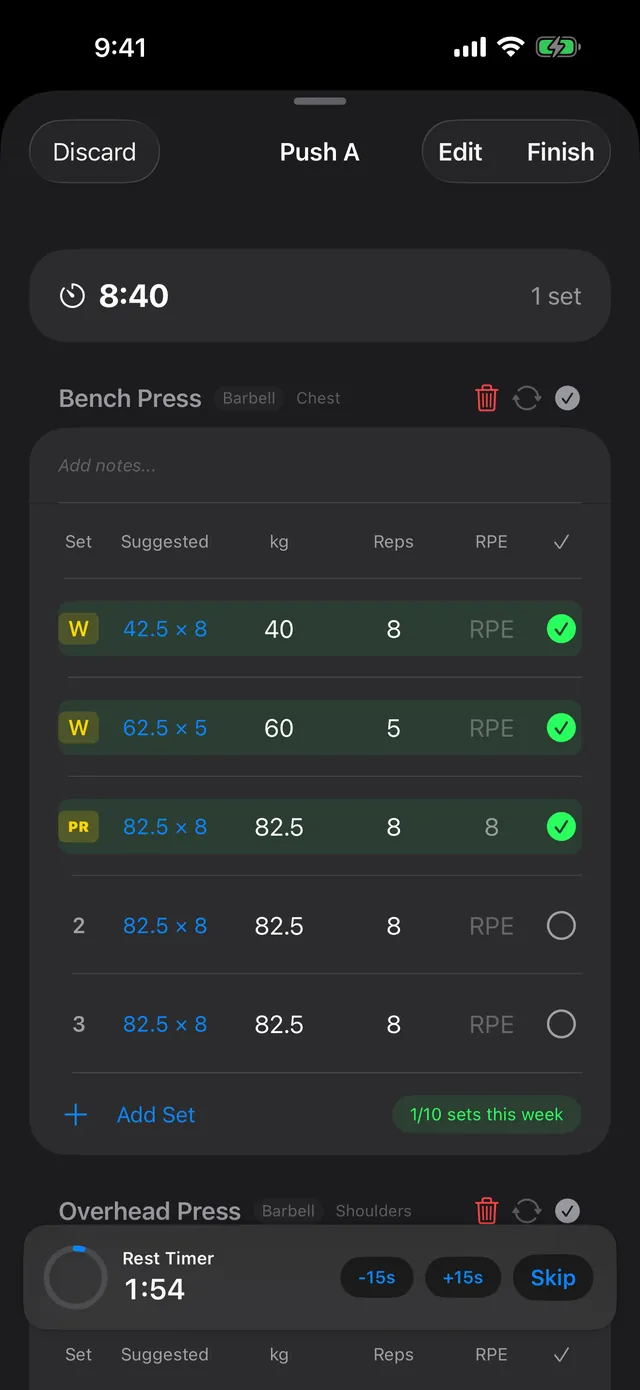
Each set has weight and reps, in kg or lb, with an optional RPE column. Start a workout from a plan or a recent workout and every set is pre-filled from your last session.
Next to each set, a Suggested target shows what to lift: last session’s reps for that set, with more weight, the same weight or about 5% less, depending on the RPE you logged for it. How to track progressive overload explains the rule.
- Set types: warm-up, drop set, superset and AMRAP.
- Exercises tracked by weight and reps, bodyweight reps, time, or distance and time.
- A rest timer with −15s, +15s and Skip.
- A Live Activity on the Lock Screen and in the Dynamic Island while you train: the current set, the rest timer and what’s up next, with buttons to change the weight and reps and complete the set.
- Quick Log: type or dictate a line like “bench 3x5 at 100kg”, and a rule-based parser on your iPhone turns it into sets.
- Log Past Workout, in the History menu, for a session you didn’t track live.
How many plans can you save?
As many as you like. Build plans from 400+ built-in exercises, add custom exercises when one is missing (there’s no limit on those either), or start from one of the 7 built-in programs:
- StrongLifts 5×5
- GZCLP
- nSuns 5/3/1 LP
- Sheiko Novice
- Push/Pull/Legs
- Upper/Lower
- Bro Split
To send a plan or a single workout to a friend, share it as a link. They open it in PRGRES.
Progress and stats
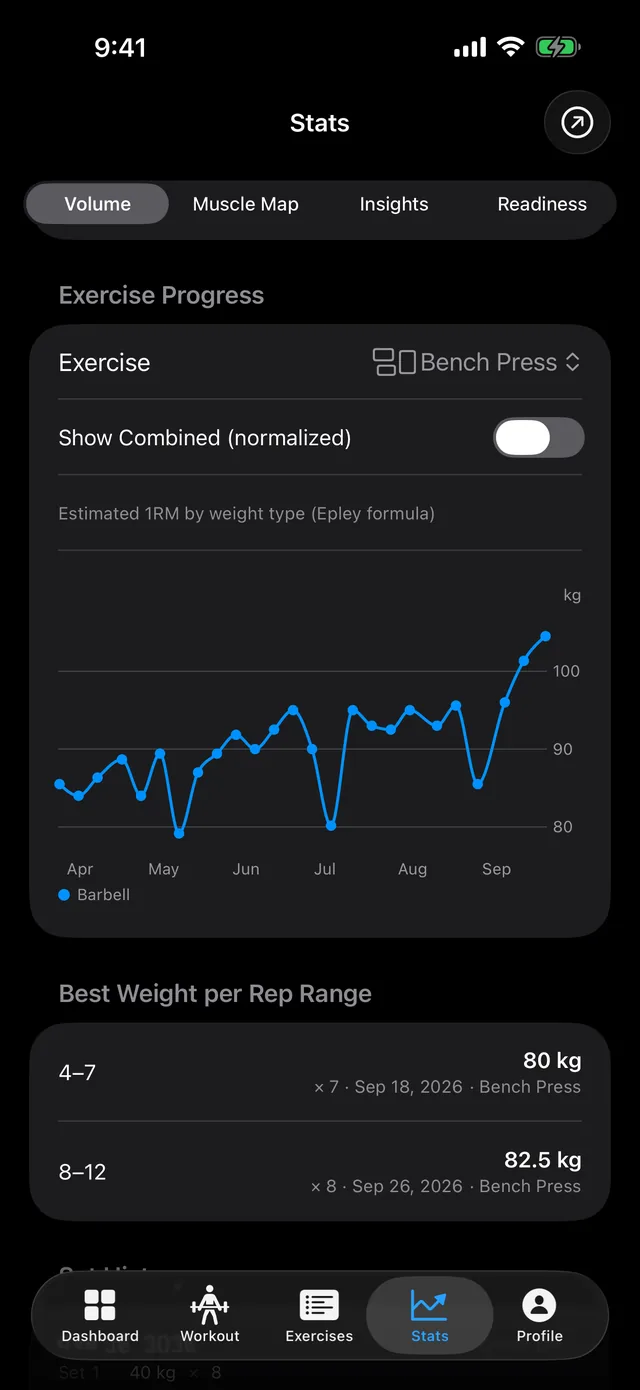
- An estimated 1RM chart for each lift, calculated with the Epley formula, and your best weight in each rep range.
- PRs found automatically: a new estimated 1RM, a new heaviest weight or a new session volume for an exercise.
- A Muscle Map with a radar chart of your sets by muscle group.
- Weekly sets per muscle, compared with the MEV, MAV and MRV volume landmarks. The article on sets per week explains them.
- Insights: rule-based notes, such as a lift that’s improving, volume that’s dropping or a push/pull imbalance.
- A dashboard with this week’s workouts, volume and sets against last week, your streak, a training heatmap and a 7-day muscle split.
- A plate calculator, a warm-up set calculator and a bodyweight tracker, under Profile > Tools.
Levels, challenges and achievements
- XP as you train, and levels with no cap.
- Two daily challenges and one weekly challenge.
- 56 achievements in 8 families, each with 7 tiers from Iron to Grandmaster.
- Strength Leagues for bench press, squat and deadlift: 7 tiers from Iron to Grandmaster, based on your estimated 1RM relative to your bodyweight. You’re placed by your own lifts, not ranked against other people.
Widgets and the Live Activity
PRGRES has 5 Home Screen widgets: Today’s Workout, Workout Streak, Next PR Target, Activity Heatmap and Muscle Group Split. During a workout, the Live Activity shows the current set and the rest timer on the Lock Screen and in the Dynamic Island. There are no Lock Screen widgets.
Can you import workouts from another app?
Yes. PRGRES imports the CSV export from Hevy, Boostcamp and WorkIt, and a generic CSV in its own format. Strong CSV import is coming in PRGRES 1.5 (November 2026). The file is read on your iPhone, and you see a preview before anything is saved.
Imported workouts count toward your XP, level and achievements: PRGRES recalculates them from your whole history after an import, and never lowers them. Routines aren’t imported, so rebuild yours as plans.
To take your data elsewhere, export all your workouts to one CSV file from Settings or the History menu. Weights in the export are in kg.
The import guide has the steps for each app.
Does it work with Apple Health?
PRGRES saves workouts you track live to Apple Health on iOS 26 or later. From version 1.4, it can also read your sleep, heart rate variability and resting heart rate for the readiness check, once you tap Connect Apple Health in Stats > Readiness. It uses them on your iPhone.
What does PRGRES cost?
PRGRES is free. Every feature in the app is free, with no limits on plans, workouts, custom exercises or history.
PRGRES+, an optional paid add-on for cloud sync, backup, and an AI coach, is planned. It isn't available yet, and nothing in the app today moves behind it.
What data does PRGRES collect?
The App Store privacy label for PRGRES reads “Data Not Collected”: the developer collects no data from the app. There’s no account and no server: your workouts are stored on your iPhone or iPad, and the app has no analytics, ads or third-party SDKs.
Some features involve Apple: dictation in Quick Log uses Apple’s speech recognition, Apple Health keeps the workouts PRGRES saves there, and iCloud or computer backups of your iPhone can include your log. The privacy policy has the details.
What PRGRES doesn’t do
- There’s no Apple Watch app.
- There’s no Android app and no web app. PRGRES runs on iPhone and iPad with iOS 17 or later.
- There’s no cloud sync. Each iPhone or iPad keeps its own log. To move it to a new phone, restore a backup of your iPhone, or export a CSV and import it on the new one.
- The interface is in English only.
Coming from another app? Free alternatives to Strong and Hevy sets their free versions next to PRGRES, with a page each for Strong and Hevy. Writing about the app? The press kit has the facts, the icon and screenshots.
PRGRES is free on the App Store for iPhone and iPad with iOS 17 or later.