Checked in PRGRES 1.6 on
How PRGRES tells you when to add weight
PRGRES is a free iPhone workout tracker that suggests the weight and reps for every set. It looks at the same set in your last session of that exercise. Give the exercise a rep range and PRGRES keeps the weight until every working set reaches the top of the range, then adds weight. Without a range, it adds weight, keeps it or takes some off depending on the RPE you logged. There's no account and no ads.

PRGRES is free on the App Store for iPhone and iPad with iOS 17 or later.
At a glance
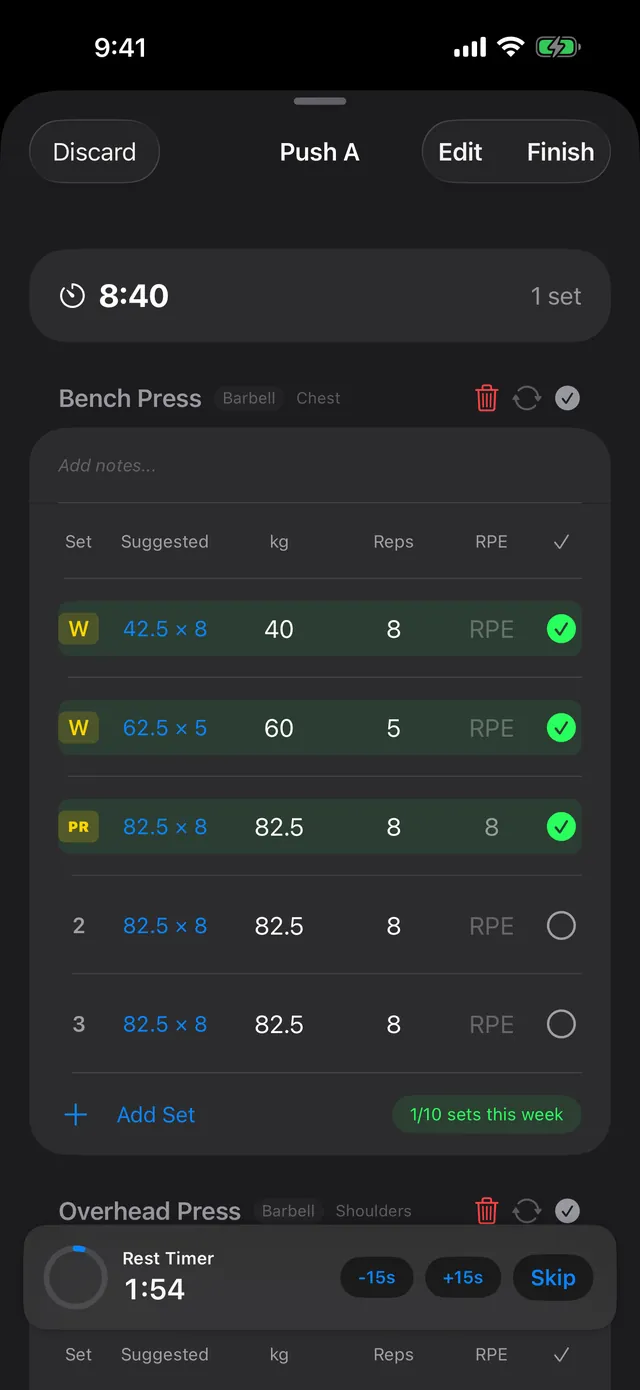
Every set: a Suggested weight and reps, from the same set last session.
Rep ranges: double progression, with weight added once every set tops the range.
RPE: optional. It decides how much weight to add, or whether to hold or back off.
Free: no account, no ads, nothing behind a paywall.
How does PRGRES use RPE to pick your next weight?
It keeps last session's reps for that set and moves the weight by the RPE you logged for it: two steps up under RPE 7, one step up from 7 to under 8.5, the same weight from 8.5 to under 9.5, and about 5% lighter at 9.5 or higher. With no RPE logged, it adds one step.
Say last session's matching set was 80 kg × 8:
| RPE logged last time | Change | Suggested |
|---|---|---|
| Under 7 | Two steps up | ↑ 85 × 8 |
| 7 to under 8.5 | One step up | ↑ 82.5 × 8 |
| 8.5 to under 9.5 | Same weight | → 80 × 8 |
| 9.5 or higher | About 5% lighter, rounded to a step | ↓ 75 × 8 |
| No RPE logged | One step up | ↑ 82.5 × 8 |
A step is 1.25 kg when the weight is under 40 kg and 2.5 kg from 40 kg up; in pounds it's 2.5 lb and 5 lb. Set 2 is compared with last session's set 2, and warm-ups and drop sets with their own kind, so they don't push your working weight around. The RPE calculator turns a set and its RPE into an estimated max.
Does PRGRES support double progression?
Yes. Set a rep range on an exercise in a plan (presets are 5–8, 6–10, 8–12 and 12–15, or set your own). PRGRES then keeps the weight and suggests one more rep per set each session, and once every working set reached the top of the range, it adds one step and drops back to the bottom of the range.
Here is a plan exercise with a range of 8–12 reps and three working sets:
| Session | You lifted (kg × reps) | Next time, PRGRES suggests |
|---|---|---|
| 1 | 60 × 8, 8, 7 | 60 × 9, 9, 8 |
| 2 | 60 × 10, 9, 9 | 60 × 11, 10, 10 |
| … | … | … |
| 5 | 60 × 12, 12, 12 | 62.5 × 8, 8, 8 |
A rep range takes priority over RPE: it's your plan, so PRGRES follows it. For bodyweight exercises with no added weight, it suggests one more rep instead of more weight, and for assisted ones it suggests less assistance.
What does it do when you stop progressing?
If an exercise's estimated 1RM has moved less than 1% over your last three sessions within 21 days, PRGRES shows a "Progress Stalled" card that suggests a deload, a different rep range or an extra set. And if you log RPE 9 or higher on one of the first two sets of an exercise with sets still to go, a banner suggests taking about 5% off the rest.
The stall check compares the estimated 1RM of your best set each session (Epley formula), so one more rep on that set counts as progress.
Do you have to log RPE?
No. The RPE column is optional. Without RPE, PRGRES suggests one step more than last time, and with a rep range on the exercise it doesn't need RPE at all. Tap a suggestion to see what you lifted last time. When you start from a plan or a recent workout, every set is already filled in, so you change only the numbers that moved.
How to track progressive overload goes through what to log and when to deload, and XP, levels and Strength Leagues covers the rewards for each personal record.
Sources
The rules on this page are the ones in PRGRES 1.6. A later version may change them; this page changes with it.

Get the app
Free, with no limits, no account and no ads.
For iPhone and iPad with iOS 17 or later.